
BACnet/IP and BACnet/SC client
A BACnet/IP and BACnet/SC client and explorer for macOS, Windows and Linux
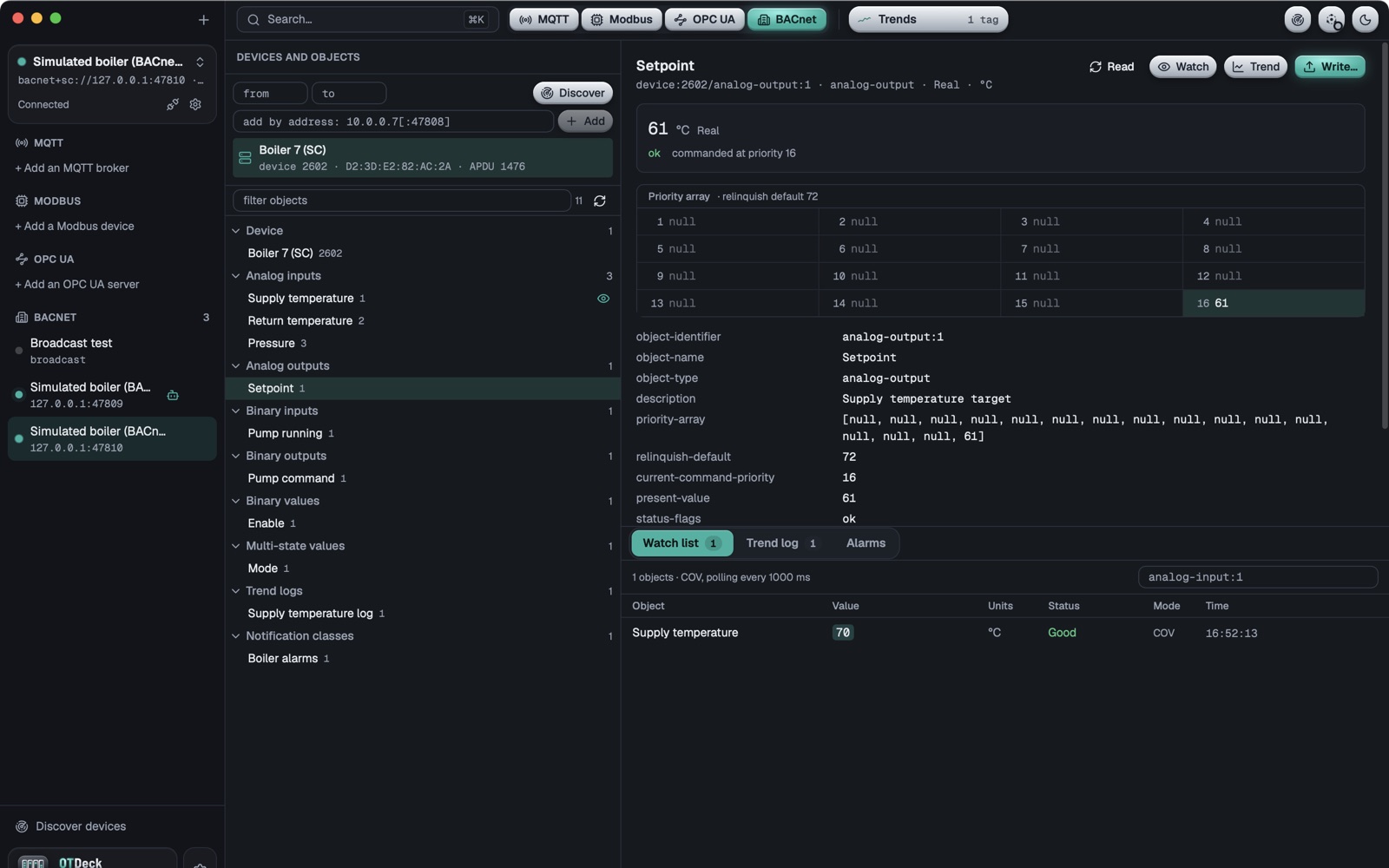
Find BACnet/IP devices with Who-Is, read their objects and properties, watch present values with COV subscriptions, write at a priority and relinquish, read trend logs and acknowledge alarms; the same over BACnet/SC through a hub with your operational certificate. OTDeck runs on a Mac as well as on Windows and Linux, and keeps MQTT, Modbus and OPC UA in the same window for mixed sites.
Demo · 2:34
BACnet/IP and BACnet/SC on the built-in simulator, start to finish
Recorded on OTDeck 0.6.0 with the built-in simulator, no cuts. Narrated; captions in the player. Watch with the transcript. Also on YouTube.
What it does
- Who-Is discovery on an interface, with an instance range, or to one address; devices behind a BACnet router listed with their network and MAC.
- Device object: name, vendor, model, firmware, protocol revision, max APDU, segmentation.
- Object list grouped by type with object names; every property of an object with units, status flags, out-of-service and the priority array.
- Watch list of present values kept fresh with COV subscriptions, polling where a device refuses; values on the shared trend panel next to MQTT topics, Modbus registers and OPC UA nodes.
- Writes at a priority with the value shown as it will be sent, Relinquish (NULL) per slot, priorities 1 to 8 refused unless allowed (Pro, behind production protection, in the write log).
- Trend logs read with ReadRange by last N, position or time range, as a table and a chart; CSV export (Pro).
- Alarms from GetEventInformation with their transitions, time stamps and priorities; AcknowledgeAlarm with the device's own time stamp (Pro).
- Schedules and calendars: the weekly schedule as a grid you edit, exceptions and calendar date lists, written day by day after a line-by-line confirmation (Pro).
- EDE export (BIG-EU layout 2.3) of one device or all of them, for BMS integrators (Pro); a commissioning report as HTML or PDF with every write of the visit.
- BACnet/SC (Pro): a node on a primary hub with an optional failover, TLS 1.3 with the standard's direct-signature check, the certificate, key and CA picked in the dialog, a CSR made in the app for your CA to sign, the hub in use and its error codes in the status.
- Hostile devices kept out: every list, string and value bounded, oversize object lists and endless segments cut, decoders fuzz-tested.
- An MCP server so AI agents browse objects, read present values, trend logs and alarms, and ask you before a write or an acknowledgement.
BACnet alarms and event notifications
With a BACnet connection open, an Alarms key in the top bar counts the alarms that wait for an acknowledgement on every device: red with any, amber when alarms are active but all acknowledged, grey at zero. A background monitor reads GetEventInformation every 10 seconds (30 on a production connection, 60 while the window is hidden), so a new alarm shows whichever screen you are on, and a system notification announces each new alarm or fault once.
- Active: the alarms of one device or all of them, filtered by waiting for acknowledgement, active, priority group and name, with the transitions (to-offnormal, to-fault, to-normal) and their time stamps. Acknowledging (Pro) records "OTDeck · your user name" as the source, so the head-end's log says who acknowledged.
- Configured: every object that reports events, with its limits, deadband, time delay and the transitions it reports. It marks a point that never reports the return to normal, and one whose notification class does not exist: the two faults that make an alarm fire with nobody told.
- Recipients: each Notification Class and its Recipient_List in plain words: who receives which transitions, on which days and hours, confirmed or not.
- Receive notifications here (Pro): OTDeck adds itself to a Recipient_List through the write guard and the write log, keeps only the entries it added, reminds you to remove them before you leave site, and never touches a head-end's entries. Removing its own entries stays free, so a lapsed licence never leaves one behind.
- Notifications that arrive are kept across restarts and listed by device and transition. When an alarm shows up in GetEventInformation but its notification has not arrived within five minutes, OTDeck points at the usual causes: a firewall on the laptop or NAT between it and the controller.
From an alarm you can open the object, make a watch rule from its limits, add the point to a checkout sheet expecting normal, or trend it. AI agents read the same list with list_events over the MCP server; they cannot change recipients.
A commissioning visit with OTDeck
- Discover: Who-Is on the site network, or register as a foreign device with the site's BBMD when the controllers sit on another subnet.
- Check each device object: vendor, model, firmware and protocol revision against the submittal, and max APDU and segmentation if large reads fail.
- Walk the points: present value, units, status flags and reliability of every input; out-of-service points stand out.
- Command outputs and setpoints at a priority from 9 to 16 (1 to 8 are refused unless the connection allows them), watch the result on the trend panel, and relinquish every slot you wrote before you leave.
- Prove the alarms: Configured shows which points alarm and on what; force a condition, see it in Active, acknowledge it and check the notification reached the head-end's Recipient_List entry.
- Hand over: the commissioning report lists the connections, every write with its priority, the trends and the alarm section, as one HTML file (Pro).
BACnet object reference
What each object type is, its type number, its properties with their identifiers, how the priority array and COV work for it and what goes wrong in the field: all BACnet object types, or straight toanalog input, analog output, analog value,binary input, binary output, binary value,multi-state value, schedule, calendar,trend log, notification class and the device object.
FAQ
Is there a BACnet explorer for Mac?
Yes. OTDeck runs on macOS 12 or later on Apple silicon and Intel, as well as on Windows 10 and 11 and Linux on x64 and Arm, with the same BACnet/IP client on all three.
Is OTDeck a YABE alternative?
For BACnet/IP and BACnet/SC, yes: discover devices with Who-Is, read objects and properties, watch present values with COV, write at a priority and relinquish, edit schedules and calendars, read trend logs, acknowledge alarms and export EDE, over UDP or through a BACnet/SC hub with your operational certificate. YABE also does MS/TP over a serial port; OTDeck reaches MS/TP devices through a BACnet/IP router.
Which BACnet transports are supported?
BACnet/IP over IPv4 (UDP 47808), foreign device registration with a BBMD for devices on other subnets, devices behind a BACnet router (MS/TP networks through the router), and BACnet/SC (Annex AB): a TLS 1.3 WebSocket to a primary hub with an optional failover hub, the certificate checks of the standard, a CSR made in the app for your CA to sign (Pro). A direct MS/TP serial link and BACnet/IPv6 are not in this version.
Is it free?
Yes, for one connection at a time: discover, browse objects and properties, watch present values and read trend logs and alarms, forever. Pro ($99 once) adds unlimited connections, writes and acknowledgements behind production protection, and CSV export.
Can I try it without a controller?
Yes. The built-in simulator runs a BACnet/IP device on 127.0.0.1:47809: Boiler 7, instance 2601, with analog, binary and multi-state objects, a commandable setpoint, a trend log and a HighTemperature alarm; and a BACnet/SC hub on wss://127.0.0.1:47810 with a test CA and a second boiler behind it, so the SC path can be tried without a hub.
What about priorities 1 to 8?
They are refused by default: 1 and 2 are life safety, 3 to 8 critical equipment control. A connection setting allows them when a device needs it; the backend refuses them otherwise, for the app and for AI agents alike.
Can an AI agent read my BACnet devices?
Yes, through the built-in MCP server: browse, read_nodes, read_history and list_events use your saved connection. With Pro an agent can ask to write a present value or acknowledge an alarm; you allow each one in OTDeck, which shows the object, the value as sent and the priority.
Does OTDeck receive BACnet alarm notifications?
Yes. It reads alarms with GetEventInformation on every device in the background, and with Pro it can add itself to a Notification Class's Recipient_List to receive the event notifications directly; it removes its own entries again, also on Free.
Why does my BACnet alarm trigger but nobody gets notified?
Usually the object's Notification_Class points at a class that does not exist, its Recipient_List is empty or limited to days and hours that do not match, or a firewall or NAT drops the notification. OTDeck's Configured and Recipients views show the first three; a missing notification after five minutes points at the last.
Download OTDeck, free forever for one connection Pricing
English · Español