
OPC UA client
An OPC UA client for macOS, Windows and Linux
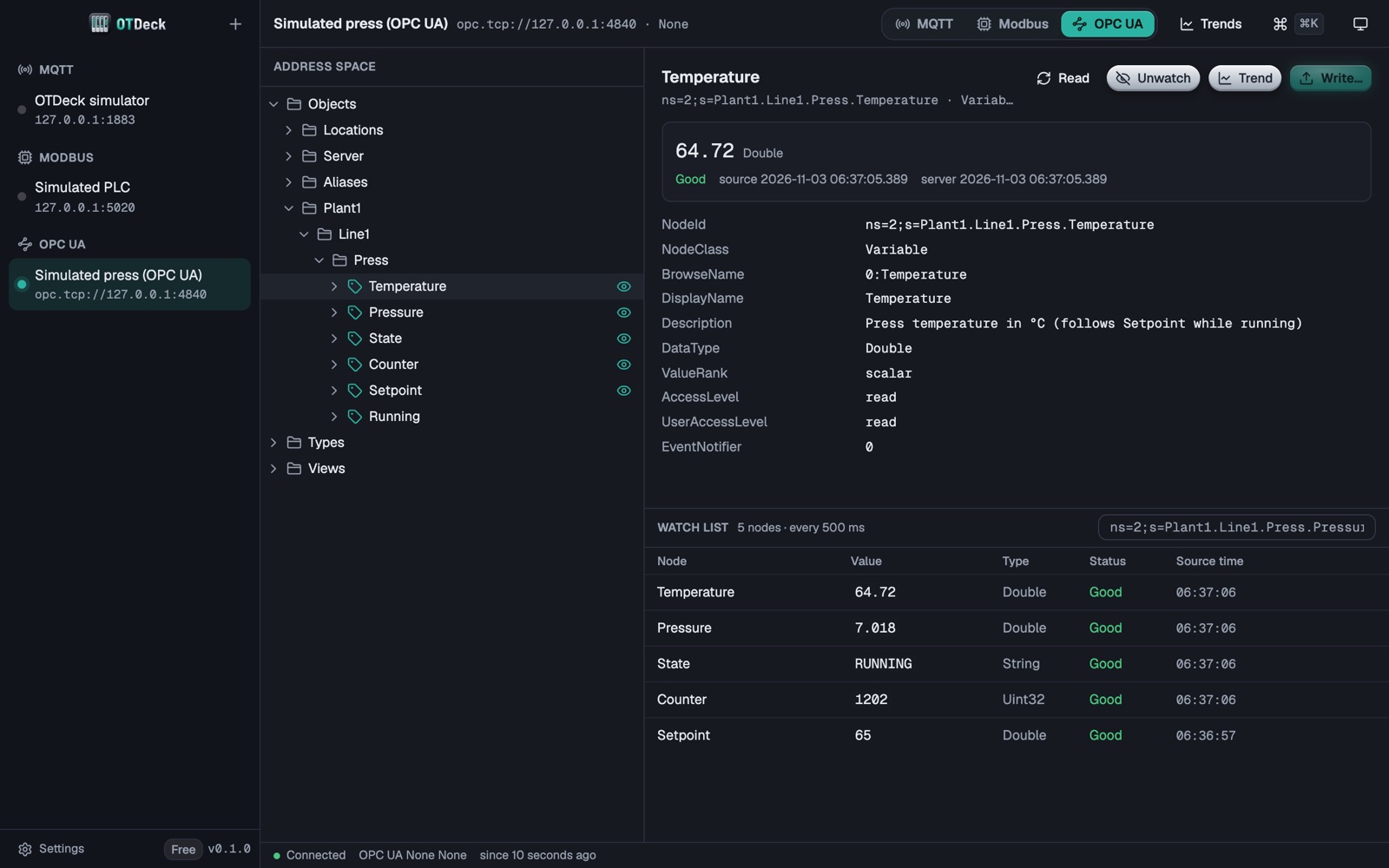
Browse an OPC UA server's address space, read node attributes and put values on a watch list with monitored items. OTDeck handles the certificates, runs on a Mac as well as on Windows and Linux, and keeps MQTT and Modbus in the same window for mixed lines.
What it does
- Address space tree with node classes, data types and attributes.
- Watch list of monitored items with live values.
- Method calls with a form from the method's arguments, the status code and the outputs (Pro).
- History read for the last 15 minutes, hour, day or any range: raw values or aggregates per interval (average, minimum, maximum, count, interpolative, start, end, range, total, time average), as a table and a chart; CSV export (Pro).
- Events and alarms: a live list with severity and source filters, ConditionRefresh, Acknowledge and Confirm with a comment (Pro).
- Client certificate made on first use; trust lists in the certificate manager (Pro).
- Writes (Pro) behind the production guard, logged with the node id and value.
- Values on the shared trend panel next to MQTT topics and Modbus registers.
- An MCP server so AI agents browse, read nodes and history and see alarms with your connection's security, and ask you to write, call methods or acknowledge alarms.
FAQ
Is there an OPC UA client for macOS?
Yes. OTDeck runs on macOS 12 or later on Apple silicon and Intel, and on Windows 10 and 11 and Linux on x64 and Arm.
Which security policies does it support?
Security mode None, and Basic256Sha256 with Sign or SignAndEncrypt; anonymous or user name and password login. OTDeck creates its own client certificate; Pro adds a certificate manager for trust lists.
Is it free?
Yes, for one connection at a time: browse, read attributes and subscribe to live values, forever. Pro ($99 once) adds unlimited connections, writes behind production protection and the certificate manager.
Can I try it without a server?
Yes. The built-in simulator runs an OPC UA server on opc.tcp://127.0.0.1:4840 with a simulated press under Plant1/Line1/Press.
Can I call methods, read history and acknowledge alarms?
Yes. Methods are called with a form built from their InputArguments, with the status code and outputs shown. History read (raw values, up to 10,000 per read, or aggregates per interval: average, minimum, maximum, count, interpolated and more) and the events panel are free; method calls and alarm acknowledgements are writes and need Pro.
Can an AI agent browse my OPC UA server?
Yes, through the built-in MCP server: browse, read_nodes, read_history and list_events use your saved connection and its security. With Pro an agent can ask to write a node, call a method or acknowledge an alarm; you allow each one in OTDeck, which shows the method and every argument as sent, or the alarm and its state.