
Wired M-Bus master (EN 13757)
An M-Bus master for reading heat, water and electricity meters on macOS, Windows and Linux
Find the meters on a wired M-Bus with a primary scan or a secondary search, read them and see every record decoded: energy in kWh, volume in m³, flow, temperatures, power, dates and the values stored at the last month end. OTDeck connects through an M-Bus to Ethernet gateway or a USB level converter, runs on a Mac as well as on Windows and Linux, and keeps MQTT, Modbus, OPC UA and BACnet in the same window.
What it does
- Connects through an M-Bus to Ethernet gateway in transparent mode (TCP, port 10001 by default) or a level converter on a serial port (2400 baud, even parity by default; 300 and 9600 baud).
- Primary scan of addresses 0 to 250 with SND_NKE, reading every meter that answers; two meters on one address are reported as a collision instead of a wrong reading.
- Secondary search: identification numbers selected digit by digit with wildcards, deeper wherever meters answer together, so every meter is found, also several on one primary address.
- Meters added from a scan or by hand, by identification number (secondary addressing, so the primary address does not matter) or by primary address, each with a name such as the flat or the riser.
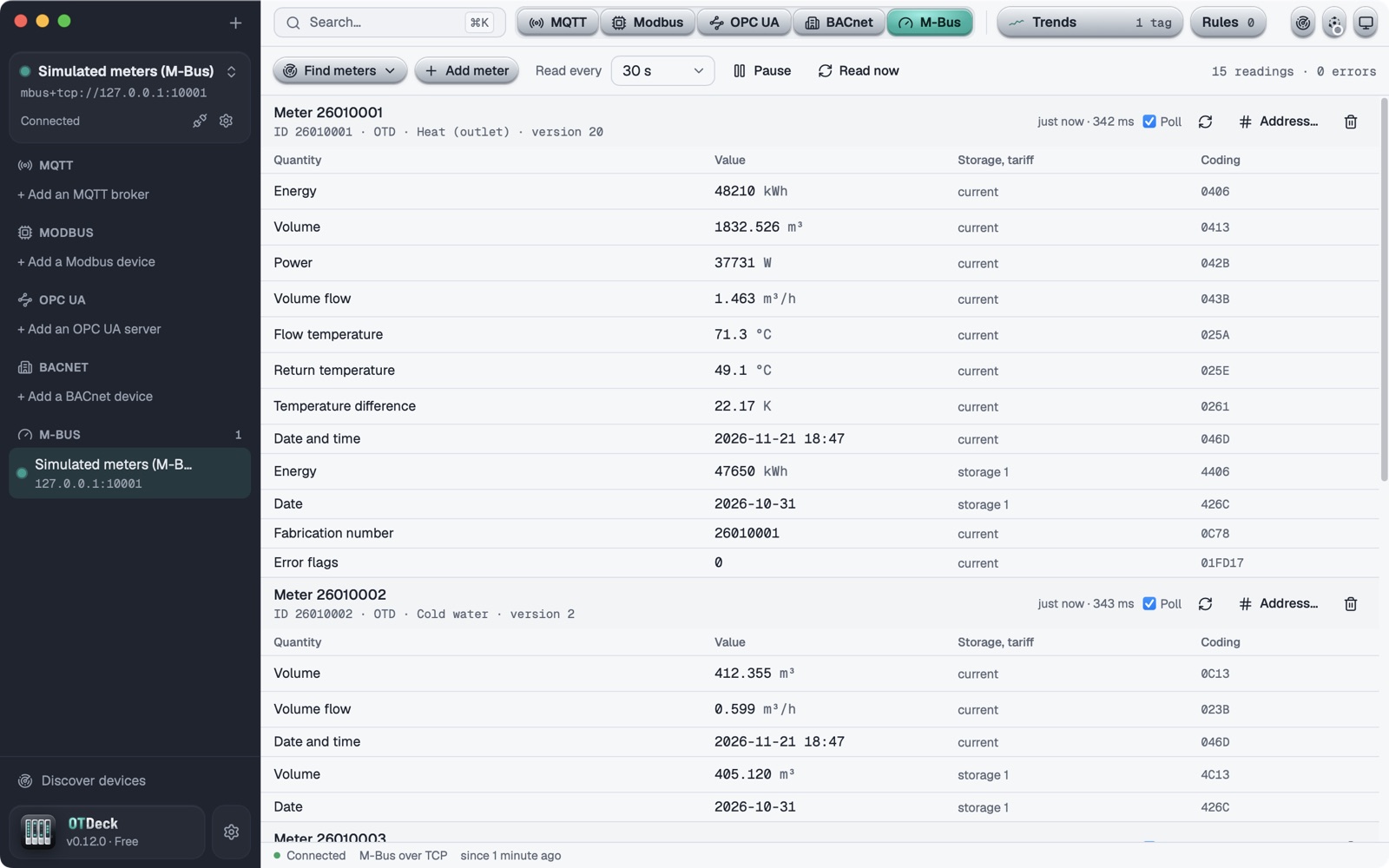
- Readings decoded per EN 13757-3: manufacturer, medium, version, access number and status; every record with its quantity, value scaled to the unit, storage number, tariff, subunit and function (instantaneous, maximum, minimum, error); BCD, integer, real and variable-length data, date and time types, plain-text units and the VIF extension tables.
- Readings that take several telegrams are read to the end with the frame count bit toggled, as the standard asks.
- Polling of the meters you mark, every 30 seconds by default (1 second to 24 hours), with a read-now button per meter; any numeric record goes on the shared trend panel next to MQTT topics, Modbus registers, OPC UA nodes and BACnet objects.
- New primary address for a meter (Pro): sent to the meter selected by its identification number, so other meters on the old address are not touched, and read back to check it took; behind production protection and in the write log.
- Readings from another master on the same bus are refused: OTDeck checks that the meter that answered is the one it selected.
- Hostile or broken telegrams kept out: lengths and checksums checked, every field bounded, the decoder fuzz-tested.
- An MCP server tool, read_meters, so AI agents read the meters of a saved connection and get the decoded records with units.
Reading a building's meters with OTDeck
- Connect the level converter or gateway to the bus and add an M-Bus connection with its address or serial port.
- Run the secondary search once: it lists every meter with its identification number, manufacturer, medium and primary address, and marks meters that share an address.
- Add the meters you need to the list, name them after the flat or the plant room, and mark the ones to poll.
- Check each meter's readings: the current energy and volume, the flow and return temperatures, the status byte, and the stored value of the last due date against the meter's display.
- Give meters that still sit on address 0 their own primary address (Pro), so a primary scan or another master can tell them apart.
- Put the values you want to watch on the trend panel, or let an AI agent read the list through the MCP server for a quick report.
FAQ
Is there an M-Bus master software for Mac and Linux?
Yes. OTDeck runs on macOS 12 or later, Windows 10 and 11 and Linux on x64 and Arm, with the same wired M-Bus master on all three: through an M-Bus to Ethernet gateway or a USB level converter on a serial port.
Which hardware do I need?
A level converter between your computer and the two-wire bus: either an M-Bus to Ethernet gateway in transparent mode (OTDeck connects to its TCP port, 10001 by default) or a USB or RS-232 M-Bus level converter (2400 baud, 8 data bits, even parity by default; 300 and 9600 baud and other parities can be set). OTDeck speaks EN 13757-2 frames itself, so the gateway only has to pass the bytes through.
How do I find the meters on a bus?
Two ways. The primary scan pings addresses 0 to 250 and reads every meter that answers; two meters on one address show up as a collision. The secondary search selects identification numbers digit by digit with wildcards and goes deeper wherever several meters answer together, so it finds every meter, also several on one primary address, as is common with factory address 0.
Which meters can it read?
Wired M-Bus meters that answer REQ_UD2 with a variable data structure (EN 13757-3): heat and cooling meters, water, gas and electricity meters, heat cost allocators and others. Records are decoded with storage number, tariff, subunit and function, values scaled to their unit, dates and plain-text units included. Telegrams spread over several frames are read in full.
Is it free?
Yes, for one connection at a time: scans, the secondary search, the meter list, polling, decoded readings and trends, forever. Pro ($99 once) adds unlimited connections and setting a meter's primary address, behind production protection and in the write log.
Can I try it without meters?
Yes. The built-in simulator runs an M-Bus gateway on 127.0.0.1:10001 with five meters: a heat meter, a cold water meter, an electricity meter whose readings take two telegrams, and two heat cost allocators that share primary address 0, so the collision and the secondary search can be tried at a desk.
Does it support wireless M-Bus (wM-Bus, OMS)?
Not in this version: OTDeck is a wired M-Bus master. Encrypted telegrams are recognised and shown with their header only.
Can an AI agent read my meters?
Yes, through the built-in MCP server: read_meters reads the meters of a saved M-Bus connection by key, identification number or primary address and returns the decoded records with their units, current values only or with the stored (historic) ones. It is read-only, and it reads at most 20 meters per call, 5 on a production connection.
Will polling drain battery meters?
Battery-powered meters count every readout, so OTDeck polls every 30 seconds by default and only the meters you mark; set the interval from 1 second to 24 hours, or read a meter only when you click.
Download OTDeck, free forever for one connection Pricing
English · Deutsch