
Modbus client
A Modbus TCP and RTU client that decodes registers for you
Poll a PLC, a meter or a drive over Modbus TCP or RTU and read the values the way the manual describes them: float32 with swapped words, a uint32 counter, a status word in hex. Save the register map with the connection, and writes on production devices stay behind a typed confirmation.
What it does
- Register ranges for coils, discrete inputs, input and holding registers, each with its own type and order.
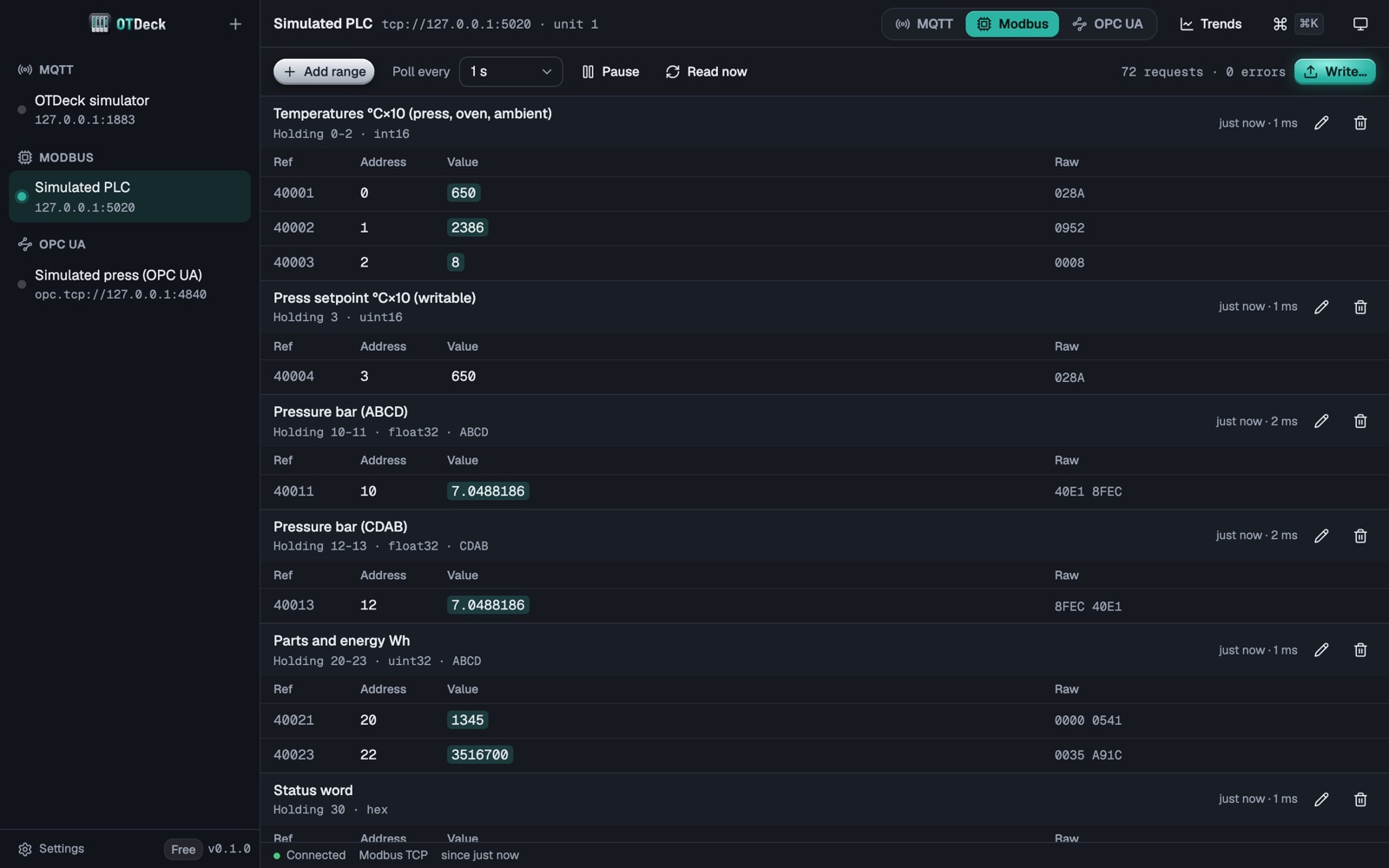
- Raw registers in hex next to the decoded value, so a wrong word order is visible at once.
- Polling at a rate you set; production connections read with one bounded request at a time.
- A scale, unit and description per range: 2305 in tenths of a volt shows as 230.5 V, the raw value stays next to it.
- Register maps from CSV (import and export) and a device library of meters and inverters (Eastron, Carlo Gavazzi, Schneider Electric, ABB, SunSpec, Victron) copied from the vendors' documents. Free.
- A scanner for unit ids (free) and readable registers (Pro), read requests only.
- Writes (Pro) behind the production guard, and a write log of every value sent.
- MQTT, OPC UA, BACnet and M-Bus in the same app, with one trend panel for all of them.
- An MCP server so Claude and other agents read registers, and ask you before any write.
FAQ
Is OTDeck a free Modbus client?
Yes, for one connection at a time, with no time limit and no disconnects: register ranges, data types, polling and live values. Pro ($99 once) adds unlimited connections and writes behind production protection.
Does it support Modbus RTU over RS-485?
Yes, on any serial port the OS sees, such as a USB-to-RS-485 adapter: baud rate, parity, stop bits and unit id per connection. On Linux your user needs the dialout group.
Which data types and byte orders?
Coils, discrete inputs, input and holding registers as int16, uint16, int32, uint32, int64, uint64, float32, float64, strings or hex, in ABCD, CDAB, BADC or DCBA order.
How does it stop a wrong write on a live PLC?
Every connection has a role. Production connections start read-only, and each write needs the connection name typed; the check runs in the app's backend. Every write goes to a local, hash-chained write log.
Can I import a register map instead of typing it?
Yes. Import a CSV, TSV or semicolon-separated register map: columns are found by name (name, table, address, data type, byte order, scale, unit), and 0-based, 1-based or 40001-style addresses are detected or chosen, with a preview of every row before anything changes. Export writes the same format back. Free on every plan.
Does it find the unit id of an unknown device?
Yes. The scanner tries unit ids 1 to 247 with one read each and lists those that answer, an exception reply counted as a device. With Pro it also walks a unit's address ranges and lists the readable registers. It sends read requests only and asks for the connection name on production connections.
Can I try it without a PLC?
Yes. The built-in simulator runs a Modbus TCP PLC on 127.0.0.1:5020 with temperatures, a writable setpoint, float32 pressures in two word orders and counters.