
MQTT client · Modbus TCP/RTU client · OPC UA client · BACnet/IP client
One desktop workbench for MQTT, Modbus, OPC UA and BACnet, with an MCP server for AI agents.
Browse an MQTT broker, poll Modbus registers, subscribe to OPC UA nodes and watch BACnet objects in one app for Windows, Linux and macOS. Production connections are write-protected, keys activate offline on air-gapped networks, and a built-in MCP server lets Claude and other AI agents read the same tags you see. An agent never writes on its own: it asks, and you allow or deny each write.
brew install --cask aleksskoz/tap/otdeckmacOS 12 or later · Apple silicon and Intel · signed and notarized by Apple, updates itself

Windows 10 or 11 · from Microsoft Store: installs without warnings and updates itself · the installer is not code-signed yet: More info → Run anyway
sudo apt install ./otdeck_0.12.1_amd64.debDebian 13, Ubuntu 24.04, Fedora 40 and newer · GTK 4 and WebKitGTK 6.0 come as dependencies
Version 0.12.1 · all files, checksums and the signature
Free forever core · Pro $99 one-time · Team $149 per seat a year · Pricing
| Source | Tag | Value |
|---|---|---|
| MQTT | plant1/press/temperature | 182.4 °C |
| Modbus | 10.0.4.12:502 · HR 40001 · FLOAT32 ABCD | 3.75 bar |
| RTU | COM3 · unit 7 · IR 30010 · UINT16 | 1 480 rpm |
| OPC UA | ns=2;s=Line1.Oven.Zone2.Temp | 214.0 °C |
| BACnet | device:2601/analog-input:1 · COV | 72.4 °C |
| MQTT | spBv1.0/Plant1/DDATA/edge1/meter | 41.2 kW |
read_topic("plant1/press/temperature")Demo · 1:48
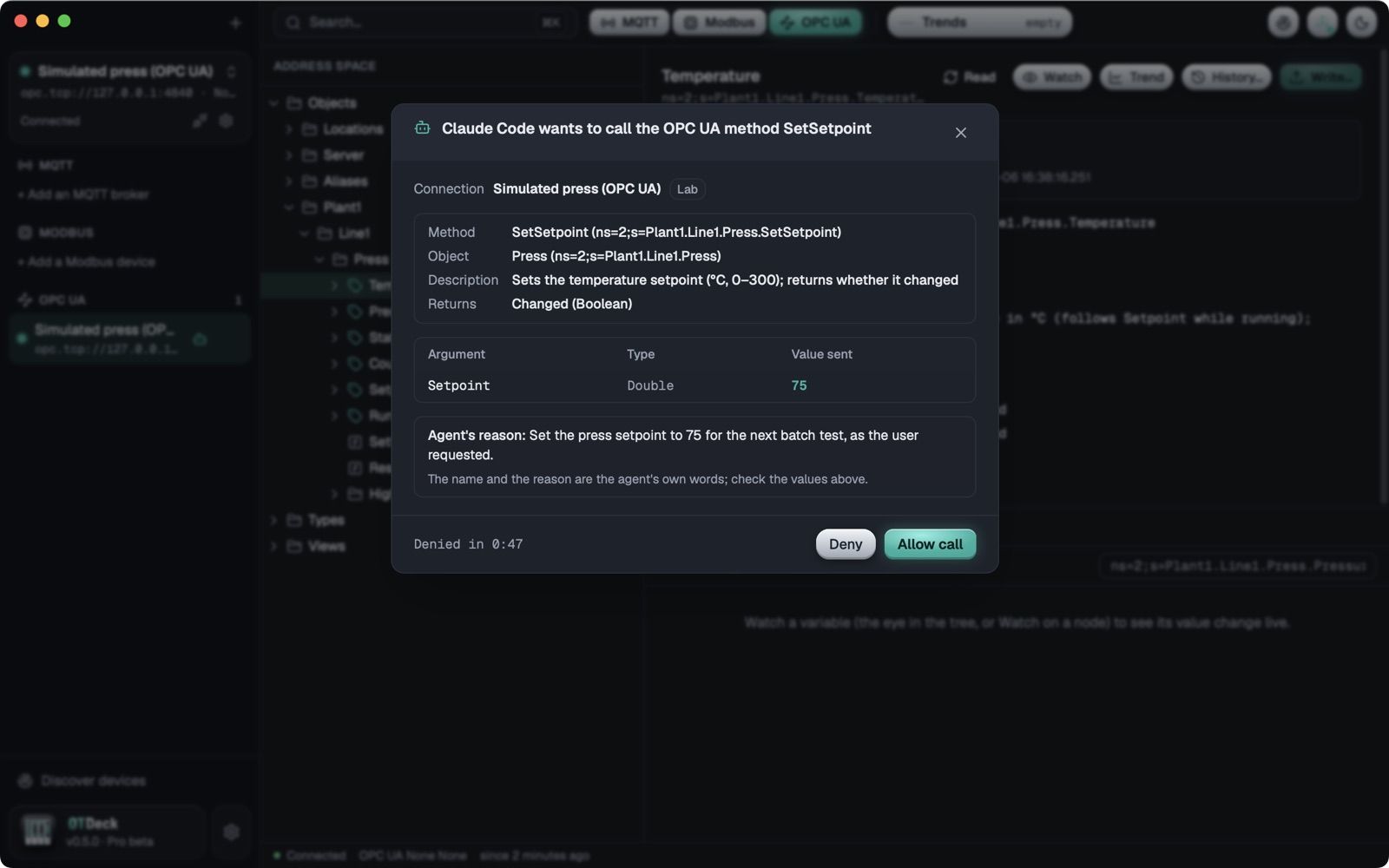
Claude Code asks to change a PLC setpoint. You allow it.
Recorded on OTDeck 0.2.2 with the built-in simulator and Claude Code, no cuts. Narrated; captions in the player. Watch with the transcript, or on YouTube.
Screenshots
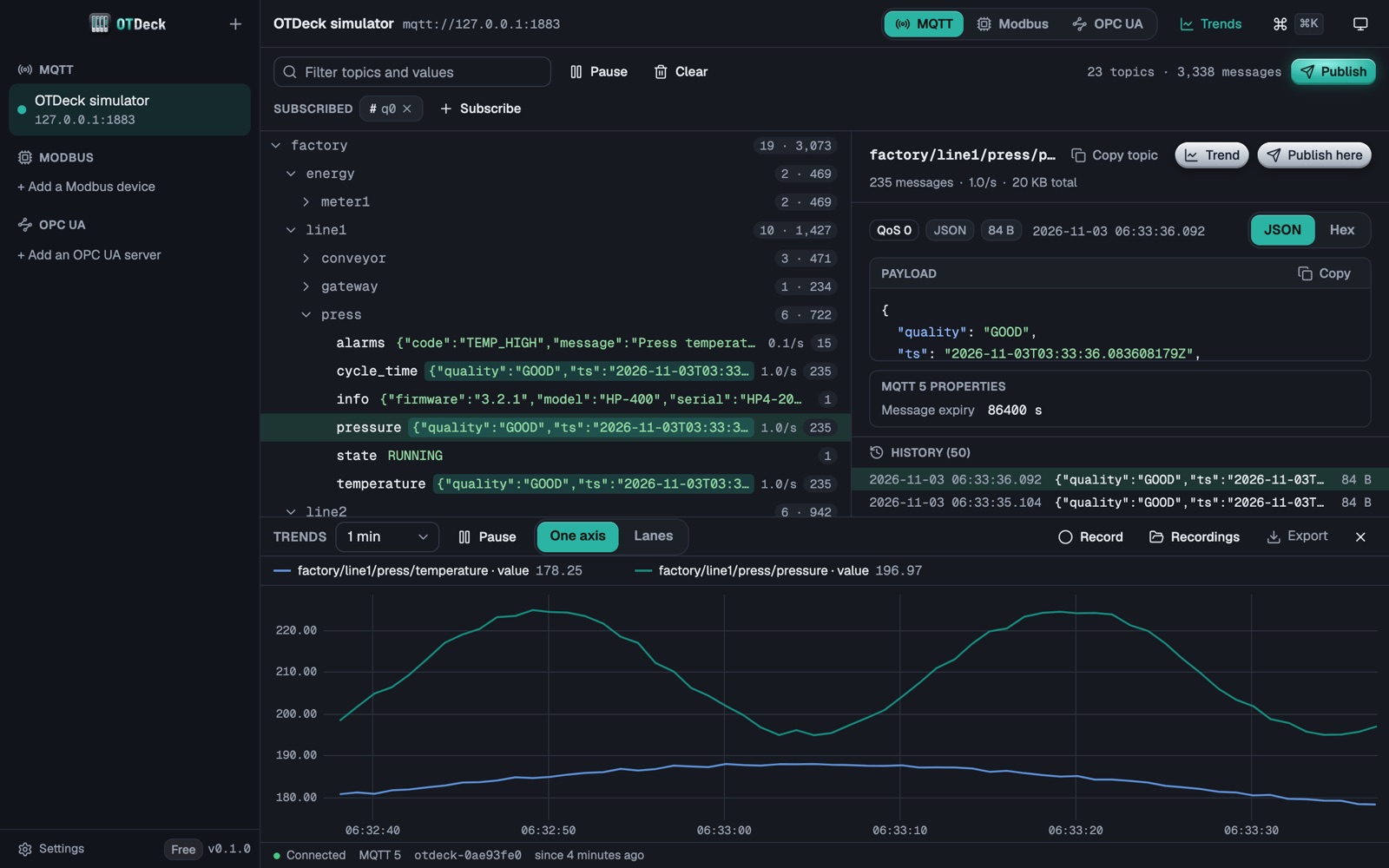
The real app, connected to its built-in simulator.
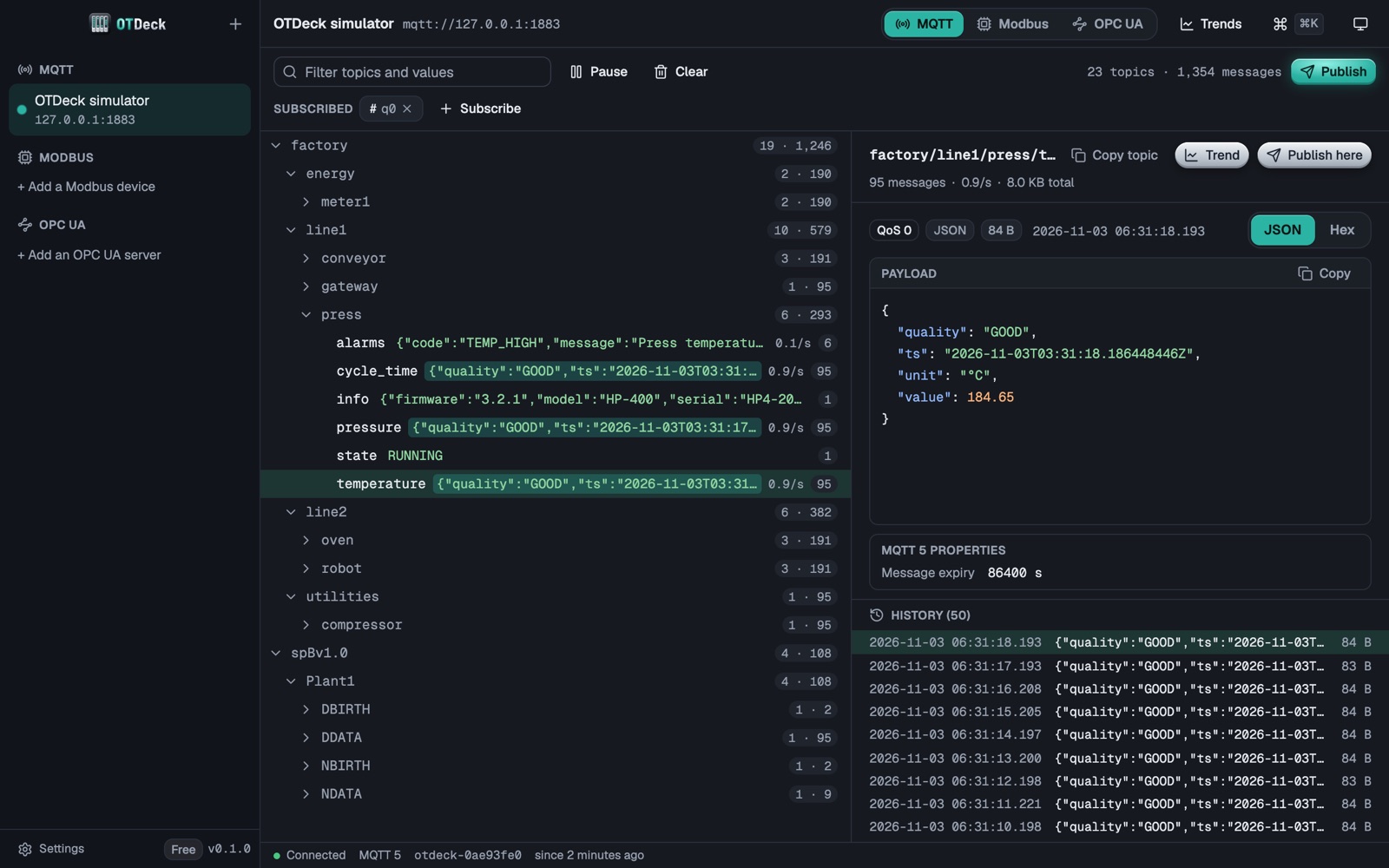
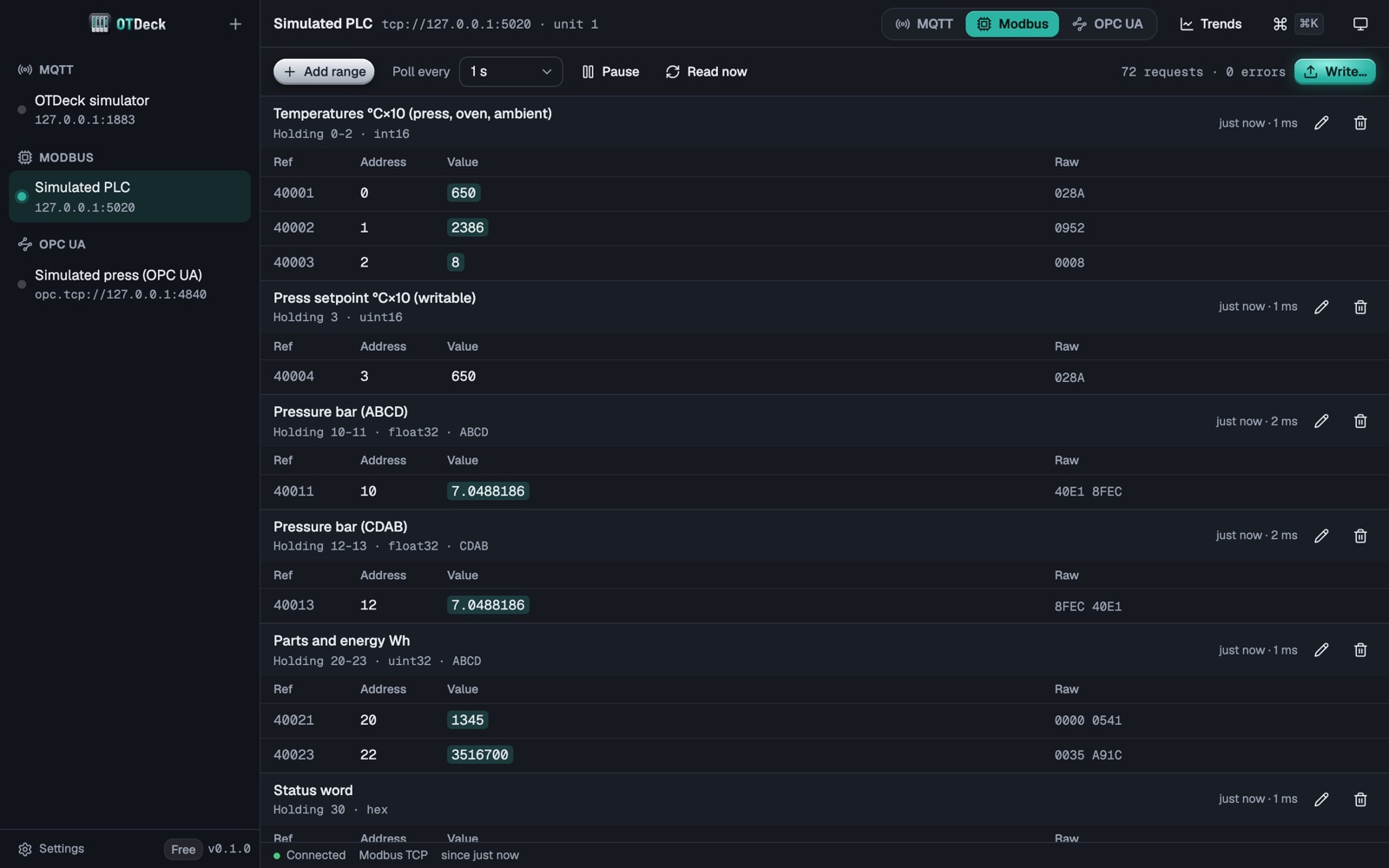
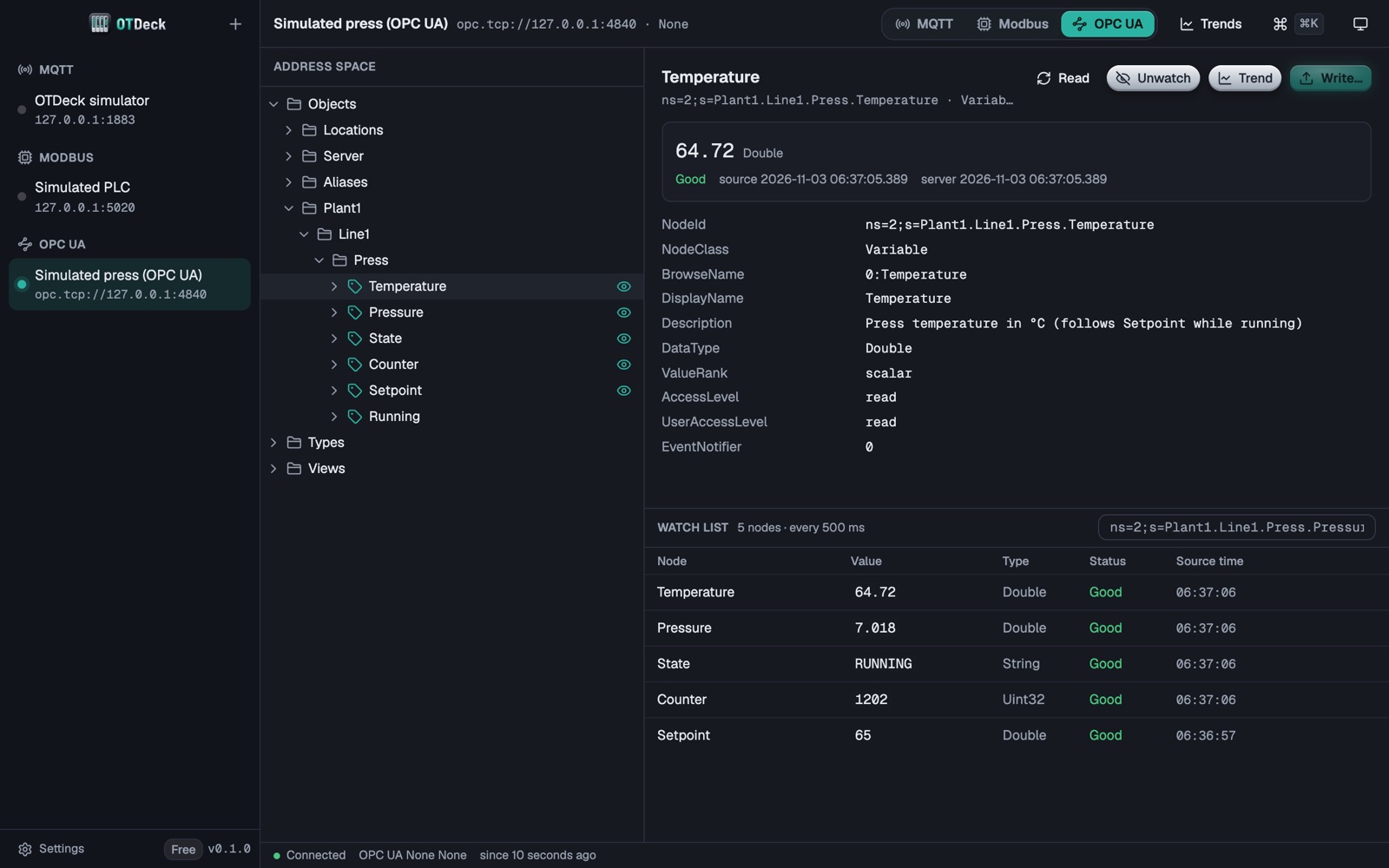
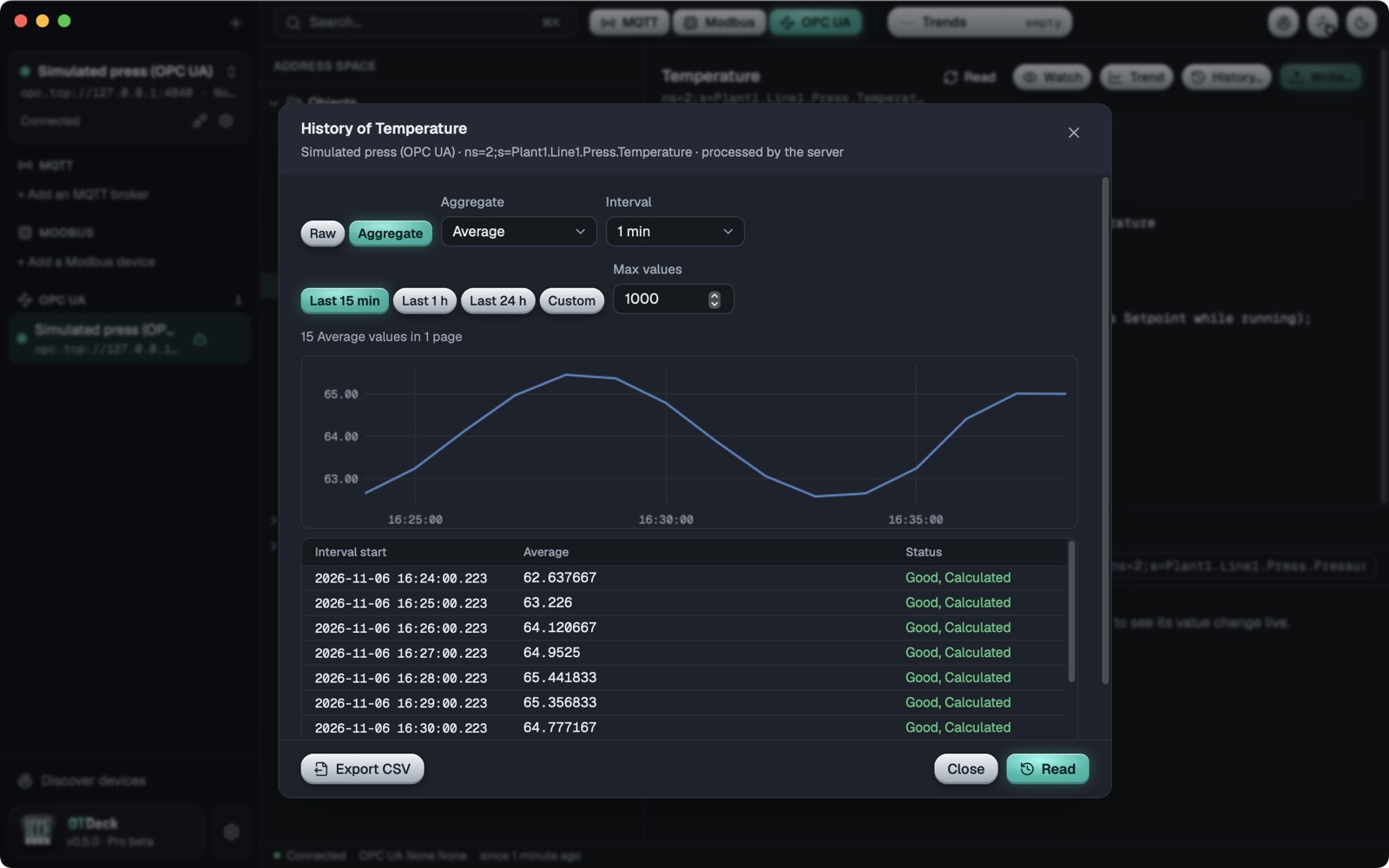
One app for five protocols
Stop switching between a Modbus tool, an MQTT tool, an OPC UA tool, a BACnet explorer and an M-Bus reader.
The same connection list, keyboard shortcuts, value view and safety rules for every protocol. Secrets stay in the OS keychain.
MQTT client
works today- MQTT 5 and 3.1.1 over TCP, TLS (CA and client certificates) and WebSocket
- Live topic tree with values, message counts and rates
- Payload as JSON, text or hex with size limits; retained and QoS
- Publish and subscriptions; Sparkplug B decoding
Modbus TCP and RTU client
works today- Register table for coils, discrete inputs, input and holding registers
- INT16/32, UINT, FLOAT32/64, strings; byte and word order you can switch
- Polling with a rate you set; RTU over serial ports (USB-to-RS-485)
- Writes behind production protection (Pro)
OPC UA client
works today- Browse the address space, read attributes, subscribe to monitored items
- None and Basic256Sha256 Sign/SignAndEncrypt; anonymous or user/password login
- Certificate manager for trust lists (Pro)
- Writes behind production protection (Pro)
BACnet/IP and BACnet/SC client
works today- Who-Is discovery, BBMD foreign device registration, devices behind a router
- BACnet/SC through a hub with your certificates (Pro)
- Objects and properties, units, status flags, the 16-slot priority array
- COV watch list with polling fallback; trend logs; alarms with acknowledge
- Writes at a priority and relinquish behind production protection (Pro); priorities 1–8 gated
M-Bus master for meters
new in 0.12- Wired M-Bus through an Ethernet gateway or a USB level converter
- Primary scan 0–250 and a secondary search that resolves collisions
- Heat, water, electricity meters and heat cost allocators decoded to kWh, m³, °C with storage and tariff
- Polling and trends; new primary address behind production protection (Pro)
Production write protection
Writing to a live line is never one click.
Every connection has a role: lab, staging or production. Production gets a clear frame, starts read-only, and each write needs the connection name typed. The check runs in the app's backend, not only in the UI.
Offline activation
Built for air-gapped OT networks.
OTDeck runs without internet. Activate a Pro or Team key with a request file and a response file carried from any online machine. No account, no cloud, no telemetry.
MCP server for AI agents
Ask Claude about your tags.
The built-in otdeck-mcp server gives Claude Desktop, Claude Code, Cursor, VS Code or any MCP client your saved connections: MQTT topics, Modbus registers, OPC UA nodes, BACnet objects and alarms, trends and recordings. Agents never write on their own: with Pro they ask, and you allow each write in OTDeck. Every call is logged. How it works
Commissioning
From the I/O list to the signed-off report in one app.
Check every point against what it should read, keep a snapshot of each device, get told when a value leaves its band, and hand over one report.
Point checkout
An I/O checkout sheet that reads the values itself.
Fill a sheet from a CSV, an EDE file, a snapshot or the watch list. Each point shows its live value next to the expected one; mark pass, fail or skip by keyboard, or let Check all now decide. With Pro, a command test writes a value, reads it back and puts the old one back.
Watch rules and snapshots
Know when a value leaves its band.
Watch rules raise a system notification on a threshold, a band, a stale value or bad quality. Snapshots keep every value of a device so you can compare two of them, or one with now. Global tag search (⌘K) finds a tag on any open connection.
Commissioning report (Pro)
One HTML file for the handover.
The connections, every write from the write log, rule alarms, trends, the checkout sheets with their results and the snapshot comparison of a time window, with room for signatures. It opens in any browser and prints cleanly.
Compare
OTDeck next to the tools you already know
Modbus Poll, MQTT Explorer, UaExpert and QModMaster are good tools, and many engineers keep several of them installed. Here is what each one covers, from the vendors' own pages.
| OTDeck | Modbus Poll | MQTT Explorer | UaExpert | QModMaster | |
|---|---|---|---|---|---|
| MQTT (3.1.1 and 5) | ✓ | — | ✓ | — | — |
| Modbus TCP | ✓ | ✓ | — | — | ✓ |
| Modbus RTU (serial, RS-485) | ✓ | ✓ | — | — | ✓ |
| OPC UA | ✓ | — | — | ✓ | — |
| BACnet/IP and BACnet/SC | BACnet/IP; BACnet/SC with Pro | — | — | — | — |
| Wired M-Bus (meters: primary scan, secondary search) | ✓ | — | — | — | — |
| Point checkout sheet with live pass/fail | ✓ | — | — | — | — |
| Commissioning report (HTML: writes, alarms, trends, checkout) | Pro | — | — | — | — |
| Windows | ✓ | ✓ | ✓ | ✓ | ✓ |
| Linux | amd64 and arm64 | — | ✓ | ✓ | build from source |
| macOS | ✓ | — | ✓ | — | — |
| Built-in simulator (MQTT, Modbus, OPC UA, BACnet, M-Bus) | ✓ | — | — | — | — |
| Built-in MCP server for AI agents | 18 tools; writes, method calls and alarm acks only after you allow each | — | — | — | — |
| Price | Free core; Pro $99 once | $129 per licence | Free, open source | Free download, registration | Free, open source |
Checked on the vendors' websites in November 2026. Compared with OTDeck 0.12.1. Something out of date? Write to support@otdeck.com and we fix it.
In detail: OTDeck vs Modbus Poll · vs MQTT Explorer · vs UaExpert
Pricing
Free forever core. Pay once for Pro.
Every plan has all five protocols. Prices in USD; tax is added at checkout where it applies.
Free
$0 forever
- MQTT, Modbus TCP/RTU, OPC UA, BACnet/IP and M-Bus
- 1 connection open at a time
- Browse, read, subscribe, live values
- MQTT publish
- Trends for the last 5 minutes
- Sparkplug B decoding
- Point checkout: 1 sheet of 25 points
- 2 watch rules, 3 device snapshots, global tag search
- MCP server for reading, 1 connection
Pro
$99 one-time
- Everything in Free
- Unlimited connections at once
- Writes to Modbus registers, OPC UA nodes and BACnet objects, with production protection
- Unlimited trends, export to CSV and Parquet
- Recording and replay of sessions
- Commissioning report: writes, alarms, trends, checkout and snapshot sections
- Point checkout: 100 sheets of 2000 points, command test, CSV export
- Up to 200 watch rules, unlimited snapshots
- BACnet/SC connections; OPC UA certificate manager
- MCP on every connection; agents ask, you allow each write
- 1 year of updates, up to 3 devices; offline activation
Team
$149 per seat / year
- Everything in Pro
- Shared projects: devices and register lists from a file, a git checkout or a URL, no passwords inside
- Team policy: production read-only on every computer, what AI agents may read, no agent writes
- One key per seat, assigned by email in the customer portal
- Managed key and project deployment, offline activation
- Priority email support
Checkout by Polar, our reseller and merchant of record. 14-day money-back guarantee on every purchase (refund policy).
FAQ
Questions engineers ask
Is OTDeck a SCADA or HMI?
No. It is an engineering and diagnostics workbench: browse, read, watch and (when you allow it) write values while you commission, integrate or troubleshoot. It is not a safety system and must not be used for process control.
Is the free version really free forever?
Yes. All five protocols, browsing, reading and live values, MQTT publish, 5-minute trends and reading through the MCP server stay free, with one connection open at a time. No trial timer, no disconnect every 10 minutes.
Does it work on air-gapped networks?
Yes. OTDeck needs no internet to run. Pro and Team keys can be activated offline: the app writes a request file, you activate it at otdeck.com/activate from any online machine, and import the response file.
Can an AI agent write to my PLC?
Not on its own. Agents read by default. With Pro you can set a connection to "Read and write" for agents; then an agent can only ask: OTDeck shows the values now and the new ones with the agent's reason, and nothing is written until you click Allow (on production you also type the connection name; no answer in 60 seconds is a denial). The MCP server never writes itself, every write is in the write log with the agent's name, and a team policy can forbid agent writes altogether.
Which Windows, Linux and macOS versions?
Windows 10 and 11 (x64 and Arm), Linux with GTK 4 and WebKitGTK 6.0 on amd64 and arm64 (Debian 13, Ubuntu 24.04, Fedora 40 or later; .deb, .rpm and tar.gz), and macOS 12 or later. Modbus RTU uses any serial port the OS sees, such as a USB-to-RS-485 adapter.
Does it decode Sparkplug B?
Yes, in every plan: births, deaths and data messages with metric names resolved from the births, and Sparkplug metrics can go on the trend panel. Datasets and templates are summarised, not expanded.
Can I try it without a PLC or broker?
Yes. OTDeck has a simulator built in: one click starts an MQTT broker with factory telemetry and Sparkplug B, a Modbus TCP PLC, an OPC UA server, a BACnet/IP boiler and an M-Bus gateway with five meters on your own computer (127.0.0.1).
What does Pro $99 one-time mean?
You pay once and get every update released for one year, on up to 3 of your devices. After that year the last version keeps working for good; renewing is optional.
When can I download it?
Now: OTDeck 0.12.1 for Windows, macOS and Linux is on the download page, free forever for one connection. MQTT, Modbus TCP/RTU, OPC UA and BACnet/IP are tested against our simulators and testers' PLCs, brokers and servers; tell us what breaks on yours.
Try it on your own devices.
OTDeck 0.12.1 for Windows, Linux and macOS, free forever for one connection. Tell us which protocols you use and it shapes what ships next.
brew install --cask aleksskoz/tap/otdeckmacOS 12 or later · Apple silicon and Intel · signed and notarized by Apple, updates itself
Windows 10 or 11 · from Microsoft Store: installs without warnings and updates itself · the installer is not code-signed yet: More info → Run anyway